Expense tracking for freelancers that shows what you can pay yourself.
Business space. iPhone and Android.
Irregular income makes every month a guess. Yavo keeps work money and home money apart, sets tax aside as the money arrives, and gives your accountant the report. No bank login.

How it works
Add a Business space
Choose I'm a freelancer when you start, or add Business later from the space switcher. Business and Personal each keep their own expenses, income, limits and dashboard.
Let the money come in
Every payment lands in the space of the card it was paid with. Cash stays in Personal. Any single expense can be moved to the other space.
Check what you can pay yourself
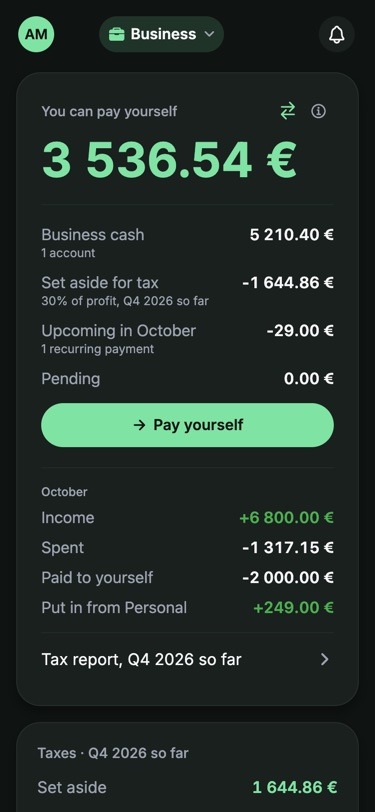
The Business home shows one number: business cash, minus the tax set aside so far this quarter, minus what is already committed.
Work money and home money, kept apart
Most freelancers pay for work and for life from the same phone, and sometimes the same card. In Yavo, each card belongs to one space, and everything paid with it lands there.
- Assign a card to Business once. From then on, every payment with it counts as business.
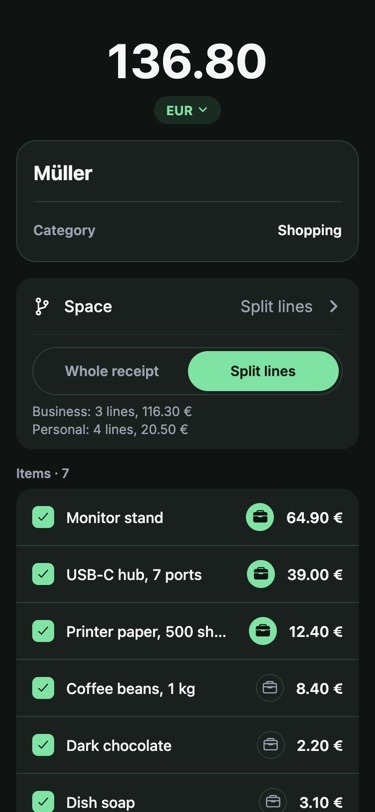
- Split a receipt by line. The monitor stand goes to Business, the coffee beans stay Personal, and tax and discounts are shared across the lines for you.
- Business categories use plain words that match your tax form, such as Advertising, Contract labor or Software.
- Switch spaces from the pill at the top of the app. Each space shows only its own numbers.
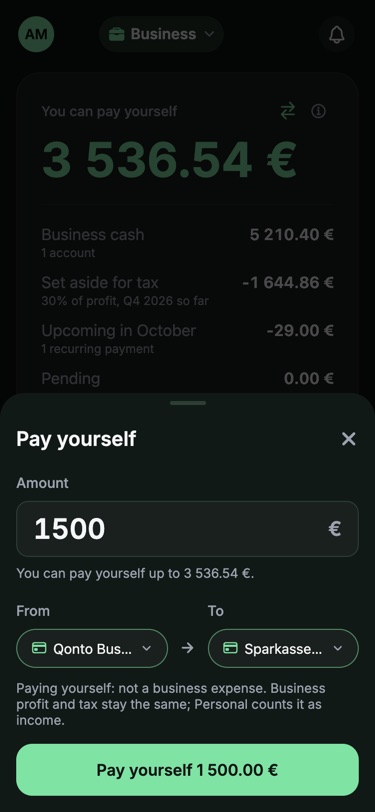
Pay yourself without counting it twice
Moving money from the business to your own account is not an expense. Record it with Pay yourself and the business profit and tax stay the same, while Personal counts it as income. Putting money into the business works the same way in reverse.
- The Business home leads with one figure: You can pay yourself.
- Pay yourself takes a business card, a personal account and an amount, and shows the limit before you confirm.
- When a statement shows money leaving a business card and arriving on a personal account the same day, Yavo suggests linking the two as a Pay yourself transfer.
How much to set aside for tax this quarter
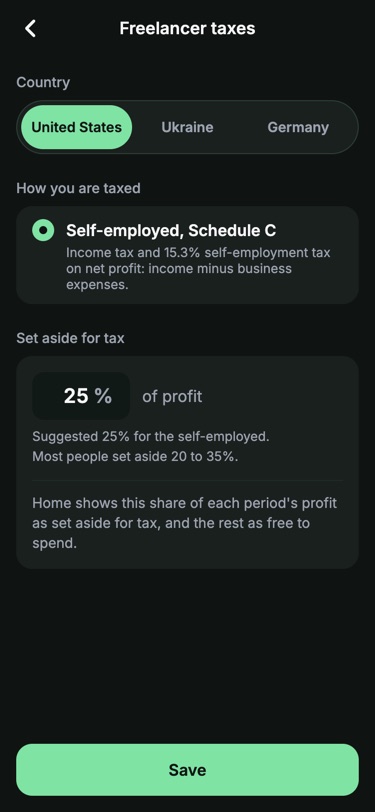
Tell Yavo where you pay tax and how. It sets a share of your profit aside as income arrives, and the Taxes card shows the total so far this quarter and the date of your next payment. Yavo also reminds you of each deadline, 3 or 7 days before as you choose, on the day and once the day after. You can change the share any time.
United States
Self-employed, Schedule C. 25% of profit by default, as a starting point for self-employment tax plus income tax.
Estimated payments are due April 15, June 15, September 15 and January 15.
Germany
Freiberufler and Einzelunternehmer. 30% of profit by default. If you are registered for VAT, the VAT you collect is held apart in full.
Prepayments are due March 10, June 10, September 10 and December 10.
Ukraine
FOP, groups 1 to 3 or the general system. Yavo works out the single tax, the military levy and the social contribution (ESV) for your group, so the figure is a calculation, not a guess.
Deadlines follow your group. For groups 1 to 3, Yavo shows how much of your yearly income limit you have used and warns you as you near it.
These are estimates to help you plan, not tax advice. Your accountant has the last word.
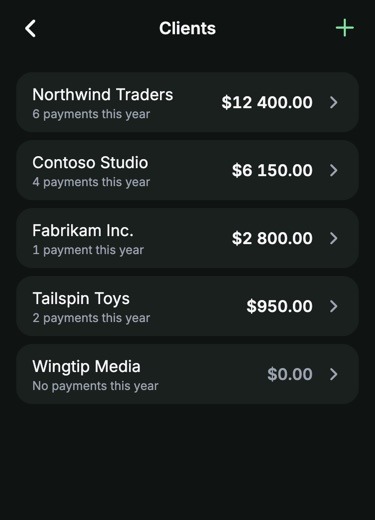
See who pays you
Add a client when you record income, with no setup first. Yavo ranks your clients by what each paid and counts the payments, so you can see where the quarter came from.
A tax report your accountant can use
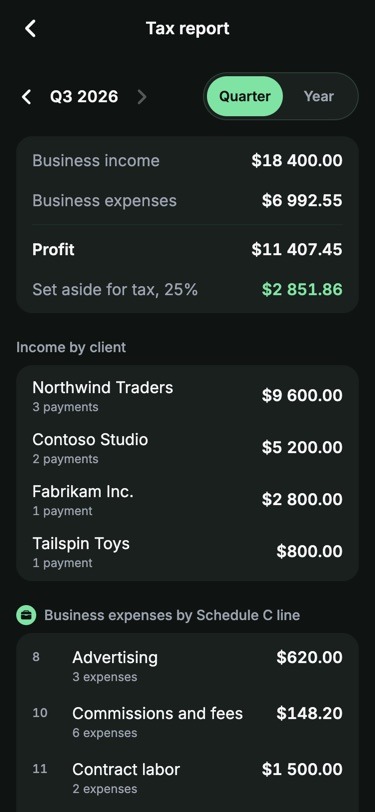
Pick a quarter or a year and tap Send to email. You get a PDF and a CSV, and your receipt photos are attached or sent as a download link when the files are large.
- Income by client, with the number of payments.
- Business expenses by line of your tax form: Schedule C in the US, Anlage EÜR in Germany.
- Taxes and fees you paid, kept apart from the rest.
- A count of expenses that still have no receipt, so you can fix them before you send it.
Expenses get in without typing
Yavo never asks for your bank login. Spending comes in the ways you already have.
Photograph a receipt
Yavo reads the merchant, the date, the total and the line items.
Receipts by email work tooForward an email
Send receipts and card alerts to your Yavo address, or email a CSV, XLSX or PDF statement.
Which statements workSay it out loud
Twelve forty-nine at the pharmacy becomes an expense with a category.
Tap to pay on iPhone
With Apple Pay set up once, the expense appears by itself.
How the Apple Pay setup works
Free tools for the paperwork
Two free tools help before you even open the app.
- Your accountant asked for a spreadsheet and all you have is a bank statement PDF? Convert it to CSV in the free tool, no account needed.
- The Subscription Finder reads a statement and lists every recurring charge, so the tools you pay for each month are no surprise at tax time.
Questions
What is the best way to track expenses as a freelancer?
Keep work money and home money apart from day one, capture every receipt when you pay, and look at the totals each quarter. Yavo does the first two for you: each card belongs to a space, and receipts, statements, voice and Apple Pay all get in without typing.
Can I use Yavo as an expense tracker if I am self-employed?
Yes. Add a Business space for your work and keep Personal for the rest of your life. You see a separate budget, income and tax set-aside for each.
Do I have to connect my bank account?
No. Yavo never asks for your bank login. You photograph receipts, forward emails or statements, speak an expense or pay with Apple Pay.
How does Yavo work out how much to set aside for tax?
You choose your country and how you are taxed. Yavo applies a default share to your profit so far this quarter (25% in the US, 30% in Germany) or, for a Ukrainian FOP, the rates and contributions of your group. You can change the share. It is an estimate for planning, not tax advice.
What does my accountant get?
A PDF and a CSV for the quarter or the year, with your receipts attached or linked. Expenses are listed by the lines of your tax form, with income by client. Filing stays with you and your accountant.
What does You can pay yourself mean?
It is the money in your business accounts, minus the tax set aside so far this quarter, minus upcoming recurring payments and anything pending. What is left is yours to move to your own account.
Can I keep my personal budget in the same app?
Yes. Personal and Business sit side by side. Switch between them at the top of the app.
Which countries does the tax profile cover?
The tax profile is available for the US, Germany and Ukraine.
Nothing to type. Nothing to connect.
Statements and receipts by email, receipt photos, voice, and Apple Pay taps on iPhone, all counting against a budget you can actually keep.