AI Budgeting App: How yavo Predicts Your Spending, Categorizes Automatically, and Reads Every Receipt Line by Line
July 3, 2026
Search "AI budgeting app" and most results are the same thing with a new label: a normal expense tracker that sorts transactions into categories and calls it AI. That's not prediction - it's just automation of a task you used to do with a dropdown menu.
A budgeting app that's actually using AI should do three things a static tracker can't: learn from your history well enough to tell you what's coming before it happens, trust its own judgment enough to stop asking you to confirm the obvious, and understand messy, real-world input - a spoken sentence, a crumpled receipt - well enough to turn it into structured data on its own.
That's the bar yavo is built around. Here's how it works.
It Learns Your Patterns to Predict What's Coming
Most apps show you what you've already spent. yavo looks at your history - recurring bills, weekly habits, upcoming due dates - and projects forward, so you see next week's likely spending and upcoming totals before they hit, not after.
That turns budgeting from a monthly post-mortem into something you can actually act on ahead of time. See a projected overspend in a category before it happens, not in a report three weeks later.
Automatic Categorization, Every Time You Log Something
Every expense you enter - however it gets in - is automatically sorted into the right category based on merchant data, with no manual tagging step.
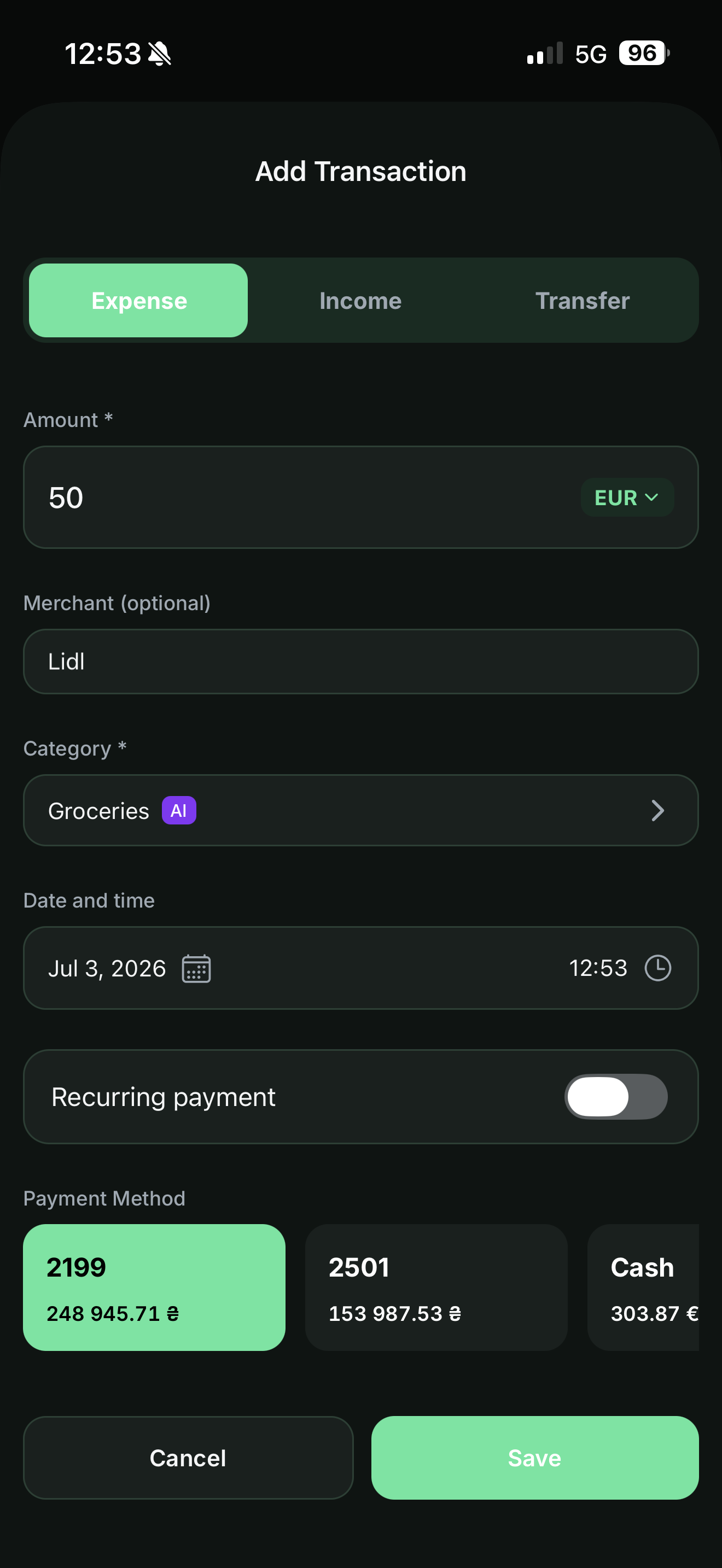
You're not stuck maintaining a growing list of "Uncategorized" transactions or re-teaching the app the same merchant every month. Type "Lidl" and it knows it's Groceries. Type "Netflix" and it knows it's a subscription. The AI badge in the category field shows when the app made the call, and you can always override it.
Voice Logging That Skips the Confirmation Step When It's Confident
Say an expense out loud and yavo parses the amount, merchant, and category from what you said. When it's confident in the read, it logs the entry automatically - no tap to confirm, no review screen in the way. It only asks you to double-check when the input is genuinely ambiguous.
The goal is that logging an expense by voice should be as fast as the thought itself, not a multi-step form with extra taps. Say "coffee 4.50" while you're walking out the door and it's done before you've put your phone away.
Receipt Scanning That Reads the Whole Receipt, Not Just the Total
This is the feature that does the most work.
Scan a receipt and yavo doesn't just grab the merchant name and total - it parses every individual line item on it. That means every purchase you've ever scanned becomes searchable at the item level, not just the receipt level.
Instead of only being able to see "you spent $340 at the grocery store this month," you can ask "how much have I spent on coffee" or "show me every receipt with diapers on it" and get a real answer, across every store, every month.
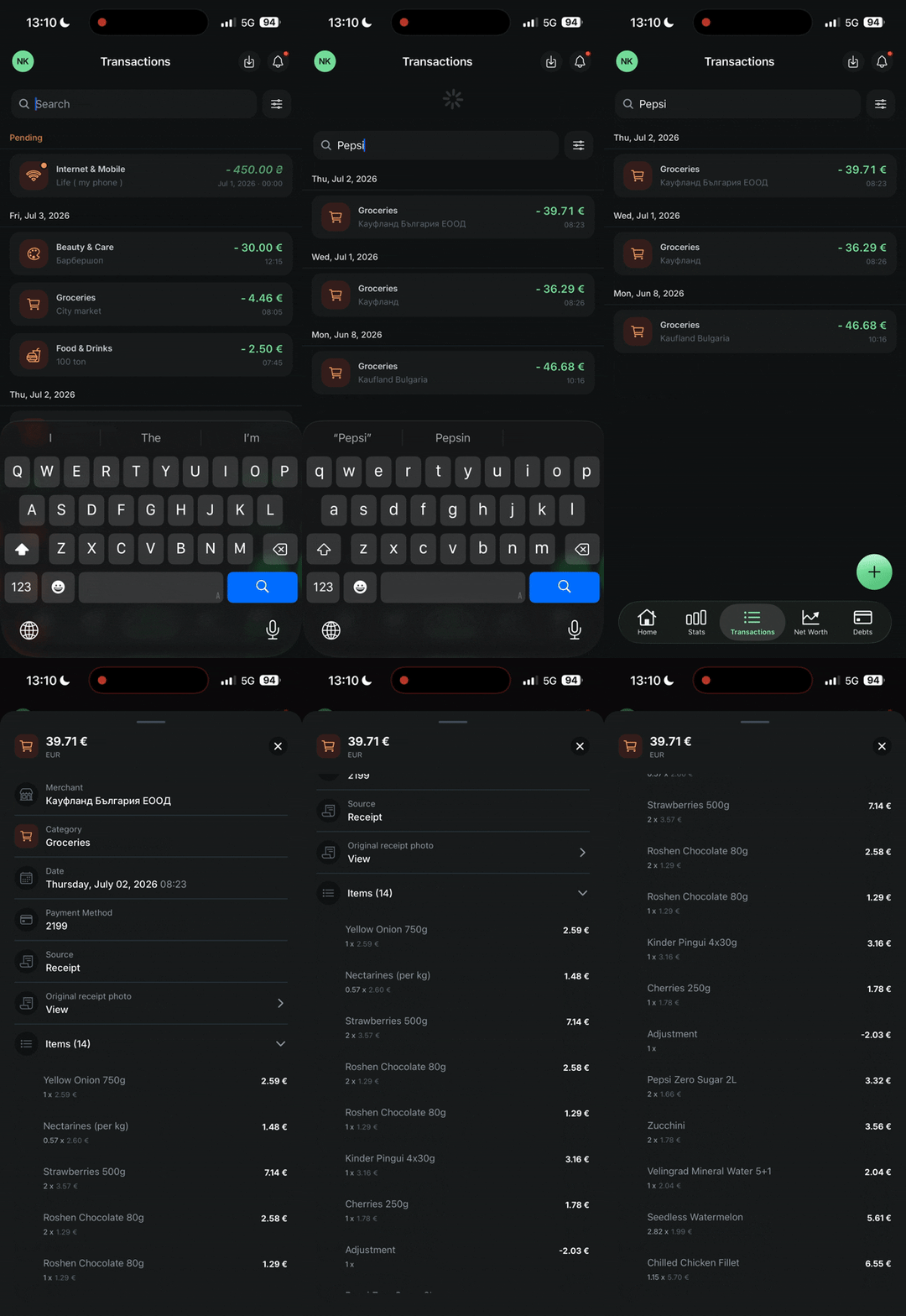
Most budgeting apps stop at the merchant and the total. Item-level parsing and search is where yavo goes further - and it's the single feature that makes the difference between "logged" and "actually useful data."
Why This Matters
An app that syncs a bank feed and slaps a category label on each line is doing bookkeeping, not intelligence. The actual value of AI in a budgeting app is in the parts a human wouldn't bother doing manually: forecasting before the money's spent, skipping the confirmation when the answer's obvious, and pulling structured, searchable detail out of unstructured input like a voice note or a photo of a receipt.
That's what "AI budgeting app" should mean - and it's what yavo does.
Try yavo free for a month - automatic categorization, spending predictions, voice logging, and item-level receipt search. Then $6.99/mo or $39.99/yr.
Track your expenses with Yavo - free to download